Ace Hardware: Home Improvement
- 4.7
- Rating
- 1.00M
- Installs
- Free
- Price

 Analysis by App-foxy
When I need a small repair item quickly, I usually care less about browsing a huge catalog and more about answering one practical question: can I find the right product and get it without turning a ten-minute task into an afternoon trip? That is where the Ace Hardware shopping app makes the most sense. It puts Ace Hardware Corporation’s store experience on a phone and focuses on a useful capability: helping me move from a repair idea to a product choice and, when convenient, a store visit.
I see it as a focused shopping tool rather than a general marketplace. It is free, aimed at everyone, and belongs in the shopping category. The app has been available since February 17, 2020, and its current version is 4.0.2, with support for devices running Android 7.1 or later. Those details matter if you are using an older phone, but the more important question is whether the app fits the way you buy hardware. In my experience, it is most valuable when I already have a project in mind and want to reduce uncertainty before leaving home.
Finding the right hardware is the app’s real strength
The central benefit is not simply that Ace products appear on a screen. The useful part is being able to investigate a hardware purchase before committing time to a store trip. A loose cabinet handle, a replacement fastener, a paint accessory, or a basic garden item can look obvious until I am standing in front of several similar choices. Using the app first gives me a chance to slow down, compare the wording, and decide what I actually need.
You May Also Like

 Blood Strike: 2.5 Anniversary
Blood Strike’s Loadouts Turn Every Drop Into a Tactical Gamble
A close look at Blood Strike’s custom loadouts: how fast access to signature weapons reshapes its battle royale rhythm, rewards preparation, and narrows the gap between fights.

 Pandora - Music & Podcasts
Pandora’s Music Is Easy to Start, but Harder to Recover
Pandora’s strength is its low-effort path from a seed to a station. Its weak spot is how much confidence it asks you to place in connection, setup, and quiet recovery.

 8 Ball Pool
 Is Built on Rivalries, Rematches, and Routine
A close look at the rivalries, rematches, shared routines, and unanswered safety questions that turn a quick pool match into a persistent mobile community.

 Samsung Music
’s Quiet Strength Is Playing What You Already Own
Its reach comes less from spectacle than from dependable access to a personal library. That simplicity is both the app’s strongest retention engine and its ceiling.

 AccuWeather: Weather Radar
AccuWeather Review: A Quick, Clear Forecast for Everyday Decisions
For everyday plans, the best forecast is the one you can understand quickly. AccuWeather makes rain timing, radar, and local conditions easy to act on, with a few trade-offs.

 Hill Climb Racing
Why Hill Climb Racing Still Turns Crashes Into One More Run
A tiny car, a bumpy hill and one more upgrade: Hill Climb Racing keeps resurfacing because its simple chaos makes every near-miss feel personal.
More From Our News Desk
View All News


That changes the shopping process in a small but meaningful way. Instead of walking into a store with a vague request such as “something to fix this,” I can use the phone to narrow the request into a product type. I still need to understand my project, but the app helps turn a household problem into a shopping decision. The best use of Ace Hardware is reducing wasted trips, not replacing practical judgment.
I also appreciate that this approach suits the way hardware is normally bought. Many people do not shop for these items every week. They notice a broken latch, an empty box of screws, or a missing tool only when a task is already waiting. A dedicated retailer app is helpful in that moment because it keeps the search connected to a hardware store instead of making me sort through unrelated marketplace results.
The app’s public reception supports that practical appeal. It has an average rating of 4.7 from around 85 thousand ratings, with more than 9 thousand written reviews, and it has passed a million installs. I would not treat those figures as proof that every search will be smooth, but they do suggest that many shoppers find the app useful enough to keep using. The developer, Ace Hardware Corporation, has built it around a familiar retail destination rather than an unfamiliar third-party seller.
What I would do before opening the app
The quality of the result depends heavily on how clearly I describe the job to myself first. Before searching, I try to note the dimensions, material, color, quantity, and the part I am replacing. For a screw or fitting, I keep the old piece nearby. For a filter, bulb, or accessory, I check the model information on the original item. This preparation is more important than typing a broad phrase and hoping the first result is correct.
A useful habit is to search in two stages. I begin with the plain-language problem, then refine it using the technical detail I discover. For example, I might start with a cabinet repair and then narrow the search after checking whether the existing hardware uses a particular size or mounting style. This avoids buying the first item that looks close. In hardware shopping, “almost right” often means another trip, so the app rewards a careful workflow.
I would also use the product page as a checklist rather than relying on its image alone. Hardware photographs can make different sizes look nearly identical. I compare the written description with the object in my hand, especially when buying replacement pieces. If I am unsure, I would rather pause and measure than use the app as an excuse to guess quickly.
How the shopping process feels in practice
In everyday use, the app works best when I treat it as a planning layer between my home and the store. I can investigate an item while standing beside the broken fixture, decide whether it appears suitable, and then plan the next step. That is more convenient than writing a vague note and trying to remember the details later.
The experience is less impressive when I expect the app to solve the whole repair. A product listing cannot tell me whether a wall is hiding a pipe, whether a fastener will hold in a particular material, or whether I have diagnosed the problem correctly. Those decisions still belong to me. The app helps with the retail part of the job; it is not a substitute for instructions, measurements, or experience.
That distinction is important for first-time DIY shoppers. I would recommend using the app to build a short list, then checking the item against the real project before buying. If the task involves electrical work, structural changes, plumbing, or anything safety-sensitive, I would not rely on a shopping screen alone. The app can help locate supplies, but it should not be treated as professional advice.
Another practical point is that a phone-based search can be more useful at home than in a crowded aisle. At home, I can look at the damaged part, take notes, and compare options without feeling rushed. In the store, I may be distracted by packaging and nearby alternatives. I prefer to do the investigative part beforehand, then use the store visit for confirmation and purchase.
A realistic weekend repair scenario
Imagine that a kitchen cabinet handle comes loose on Saturday morning. The handle itself is still available, but one mounting piece has disappeared. I would remove the remaining hardware, keep it beside me, and use the app to search for a compatible replacement. Rather than searching only for “cabinet handle,” I would identify whether I need the handle, a screw, a nut, or a complete mounting set. That small distinction can prevent buying a decorative replacement when the real need is a fastening part.
Next, I would compare the visible shape and the relevant size information with the piece I still have. If the result seems suitable, I could use that information to decide whether a store trip is worthwhile. If I discover that the replacement does not match, I have learned that before driving over. If it does look right, I arrive with a clearer purpose and less temptation to buy an unnecessary full set.
This scenario shows the app’s strongest effect: it turns a frustrating interruption into a more organized errand. It does not make the repair itself easier, but it can make the product-search stage less wasteful. For people who live near an Ace location, that difference may be enough to justify keeping the app installed.
Where it fits beside ordinary alternatives
Compared with visiting a store without preparation, the app gives me more time to think and check details. Compared with a broad online marketplace, it keeps the search within a recognizable hardware retailer and makes more sense when my goal is a store-oriented purchase. Compared with a search engine, it removes some of the noise that comes from unrelated sellers, guides, and forum discussions.
Those alternatives still have advantages. A general marketplace may offer more brands or unusual parts. A search engine may be better when I need installation advice, compatibility discussions, or a visual explanation of a repair. A physical store may be better when I need to show a damaged component to someone and ask for help. I would not use the Ace app for every hardware question; I would use it when the product-finding stage is the main obstacle.
That is also why I would not recommend it to someone who rarely shops at hardware retailers or who wants one universal shopping app for every category. Its value comes from being specific. If I am comparing electronics, clothing, or household goods outside the hardware context, another service will usually be more natural. The narrower focus is an advantage for repair shopping and a limitation for general shopping.
The tradeoffs I noticed before relying on it
The first tradeoff is convenience versus confidence. Searching from a sofa is easy, but a screen cannot always communicate the texture, weight, finish, or exact fit of a physical item. I still want to inspect certain products in person, especially when appearance matters or when the replacement must match something already installed. The app can shorten the process, but it cannot remove the need to verify a close fit.
The second is speed versus precision. A broad search may produce a quick answer, while a careful search takes more effort. I prefer the slower route for parts that must fit, because a wrong screw or connector can create more work than the original problem. The app is most effective when I use its convenience to research carefully, not when I use it to rush.
The third tradeoff is dependence on a phone during a practical task. If my battery is low, the connection is poor, or I am carrying tools and materials, a written note or photograph of the old part can be easier to handle. I like having the app available, but I would not make it the only record of what I need. For a longer project, I prepare a small list before leaving home.
There is also a learning curve in hardware language. A new DIY shopper may recognize the object in a photograph but not know which specification matters. That can lead to a confident-looking but unsuitable purchase. My advice is to use the app alongside measurements and the original packaging whenever possible. If the product affects safety or depends on exact compatibility, asking a knowledgeable person remains the better choice.
Small habits that make the app more useful
I get better results when I photograph the old part before removing it. A picture of the mounting position, the remaining fastener, and the surrounding material gives me a reference while searching. I also keep the original item until the replacement is confirmed. Throwing it away too early removes the easiest comparison tool.
Another helpful habit is separating “need now” from “nice to have.” Hardware stores make it easy to add extra tools and accessories once I am already shopping. I use the app to identify the essential item first, then decide whether an additional purchase genuinely supports the project. This keeps a small repair from turning into an unfocused basket.
For repeat household tasks, I would record the exact product wording and relevant size in my notes after the purchase. That makes the next replacement easier and reduces the chance of searching from memory. The app is useful in the moment, but the lasting benefit comes from combining it with a simple personal record of what worked in the home.
I would also avoid judging a product solely by its position in a search result. I read the description, examine the image, and compare the item with the original part. If two results appear similar, I choose based on the specification that affects my project rather than on appearance. This is a small discipline, but it is especially valuable for fittings, fasteners, and replacement accessories.
Who will get the most from it
The app is a strong fit for homeowners, renters handling minor repairs, gardeners, and occasional DIY users who want a clearer shopping plan. It is particularly useful for someone who lives close enough to an Ace store that avoiding one unnecessary visit matters. A new homeowner may also appreciate the focused catalog because it is less distracting than searching the entire internet for every repair item.
Experienced DIY users can benefit too, especially when they already know the part name and want to check options quickly. For them, the app is less about learning what a product is and more about organizing a purchase before heading out. It can support a short materials list without requiring a full project-management system.
I would be more cautious recommending it to shoppers who need specialist trade supplies, extensive technical comparison, or a very broad selection across many retailers. Someone who already has a trusted local supplier may find a personal conversation more valuable than an app search. Likewise, people who prefer to browse physical shelves and ask questions in person may gain little from adding another digital step.
The age rating of Everyone makes the app broadly approachable, and its free price removes the usual barrier to trying it. Still, “free” does not mean every user will find it worthwhile. The real return is measured in saved time and fewer wrong purchases. If I have no upcoming hardware need, there may be little reason to keep opening it; when a repair appears, its usefulness becomes much more obvious.
My recommendation after using it for repair shopping
Ace Hardware is at its best as a practical pre-shopping companion. I would open it when I have a specific repair, replacement, or maintenance task and want to turn that task into a more informed store visit. Its strongest capability is not flashy; it is the ability to help me identify and evaluate hardware before I spend time traveling or browsing under pressure.
I would not present it as a complete DIY guide or as a universal alternative to every shopping service. It cannot replace measuring, inspecting a damaged part, reading instructions, or asking for expert help when the project is beyond my knowledge. Its catalog-focused approach also means that shoppers seeking unusual products or broad cross-retailer comparison may prefer another option.
For the right user, though, the app earns its place on a phone. I like it most when I use a photo, a measurement, and a clear project description together, then treat the search result as a starting point for verification. That workflow makes a simple store app more useful than its short summary suggests. If your usual hardware trip begins with uncertainty, Ace Hardware is worth trying as a free way to prepare before you leave home.
FAQs for Ace Hardware: Home Improvement
01What is the Ace Hardware app used for?
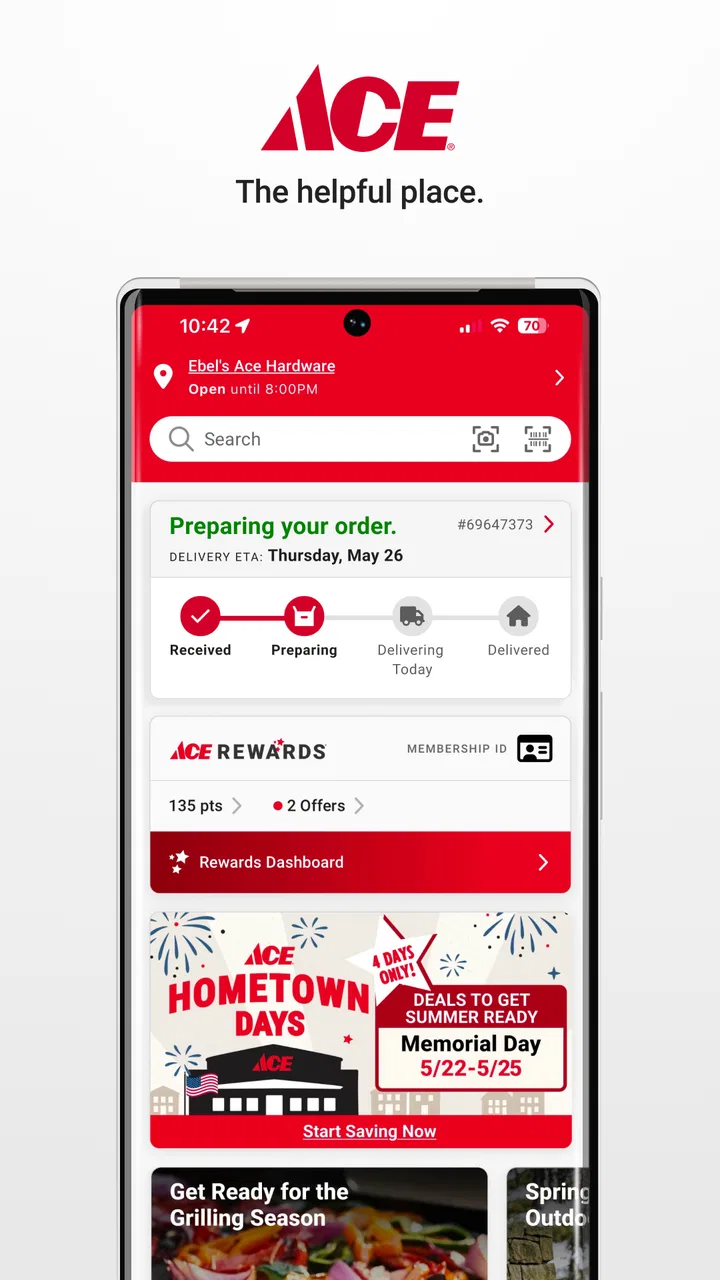
The Ace Hardware app is a convenient tool designed to enhance your shopping experience with Ace Hardware stores. It allows users to browse products, check availability, and compare prices. Additionally, you can access exclusive deals, manage your rewards, and even use the app for contactless checkout, making it a versatile shopping companion.
02Can I find all Ace Hardware products in the app?
While the Ace Hardware app offers a comprehensive selection of products available at your local store, not all items may be listed. Availability can vary based on location, and some exclusive or limited-stock items might only be found in-store. It's recommended to check both the app and your local store for the best selection.
03How does the rewards system work in the Ace Hardware app?
The Ace Hardware app integrates with the Ace Rewards program, allowing users to track points and access rewards directly from their mobile device. You earn points for every purchase, which can then be redeemed for discounts on future purchases. The app also alerts you to special promotions, ensuring you maximize your rewards.
04Is the Ace Hardware app free to use?
Yes, the Ace Hardware app is completely free to download and use. It is available on both Android and iOS platforms. There are no hidden fees associated with using the app, but purchasing products through the app will cost you the same as in-store prices. Always ensure your app is up-to-date to enjoy all features.
05How secure is the Ace Hardware app for online transactions?
The Ace Hardware app employs industry-standard security measures to protect your personal and payment information during transactions. This includes encryption and secure servers. However, it is always advisable to keep your device protected with a password or biometric security feature to enhance safety when using the app.
Pros
- Extensive product range available.
- User-friendly interface design.
- Real-time inventory updates.
- Loyalty rewards program included.
- Easy order tracking feature.
Cons
- Limited payment options available.
- Occasional app freezes reported.
- Inconsistent customer service response.
- No in-app customer reviews.
- Requires frequent updates.

Ace Hardware: Home Improvement
Gallery